
How do I keep track of when to follow-up on open invoices? Or a more simple way to put it, ‘How do I manage accounts receivable’? This was a question from an accounts receivable manager who was trying to monitor contact with multiple customers. The time between when invoice issue and invoice due date is critical. Better management of client contact can help to improve credit control. Better contact can also improve collection time. Because of the type of business this person was in, they found that regular contact (generally 3 times before due date) dramatically decreased collection time. The terms of their invoices were typically net 60. So, they selected contacting intervals of 7, 14, 30 and 60 days after issue. This is too frequent for some customers. Be sure you understand your customer needs.
Credit Control – Manage Accounts Receivable
System Requirements & Download
Credit Control Download
Download 59.50 KB 9179 downloadsUse this excel template to track when follow-up is needed on outstanding invoices. First, enter the customer/invoice specific information. Then determine the length of time until follow-up is required and the formulas do the rest. We’ve included notes within this template to help guide you along the way.
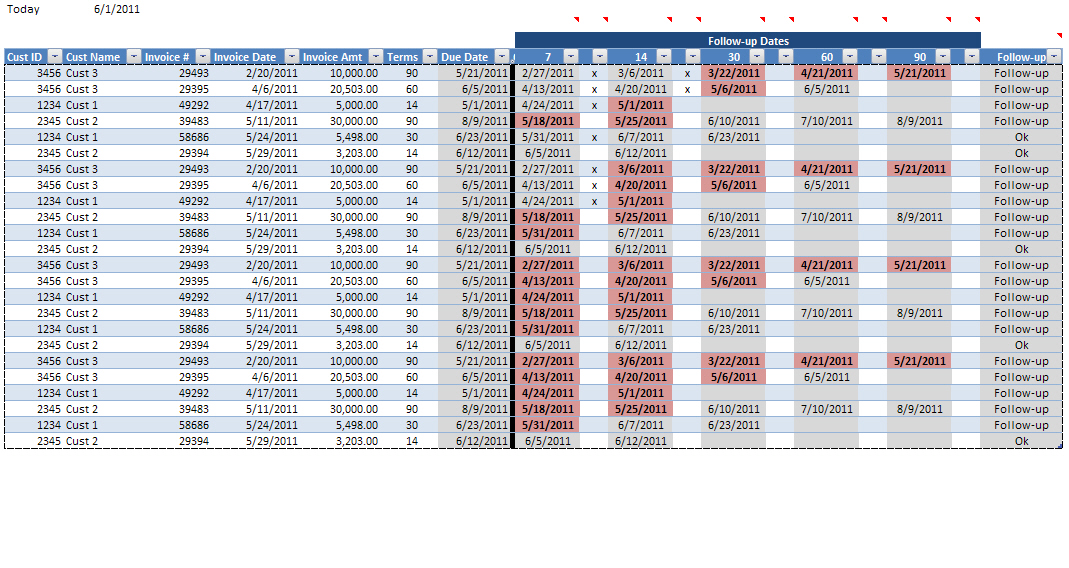
Enter all information into the cells that are not shaded gray. Gray columns include formulas.
Template Summary
- Increase AR collection time.
- Decrease write-offs.
- Improve customer relationships.
- Learn how to use Excel tables.
- Filter to identify invoices that need follow-up.
- Conditional formatting highlights missed dates.
- Effectively manage accounts receivable.
When follow-up is required and has not occurred the date turns red. Follow-up is documented by entering an “x” next to the date of follow-up. Once this done the red highlight will go away. The last column in the table will either say “Follow-up” or “Ok” as necessary. Use the filters to identify those that need to be followed-up on. To use the filter, click the drop down arrow and select the information you want to include or exclude. Going through this process on a regular basis and establishing a formal process will help you company better manage its accounts receivable.
Past Due Invoices
Past due invoices are not the focus of this post. By establishing a process to better manage accounts receivable while current, the amount of past due invoices should be minimized. However, the fact remains there will still be old items that must be dealt with. Here is how you could leverage this template to monitor past due invoices.
- Add a column to the end of the template and label it “Notes”.
- Filter the due date column, such that only those items past the due date are shown.
- Execute and document your past due procedures. These procedures may include first verbally contacting the customer follow-up by a written notice. Having the documentation on hand and available will improve future communications.
- Remember to be nice.
The effort here is to reduce past due invoices. Use this template to assist in determining which customers you should and shouldn’t be extending credit is critical. How much does a customer have to be past due before their credit is cut? Having a formal policy will help keep everyone on the same page and simplify collection.
Good luck, now go manage accounts receivable!
Didn’t find what you were looking for?
You can search for accounts receivable templates at Microsoft Office. Here you can find several templates that may help you better manage accounts receivable or your business.