SpreadsheetShoppe

  • Home
  • Downloads
    • Accounting Tools
    • Add-Ins
    • Business Tools
    • Calendars & Timelines
    • Graphs & Charts Templates
    • Lists Templates
    • Personal Finance
    • Project Management
    • Shortcut Keys
    • Stock Options
  • Useful Resources
  • Feedback/Upload
  • Blog

Open Items / Issues Log Templates


Cost: Free
System Requirements: Microsoft Excel® 2007 or later*
User Agreement: Read it Here
Creator: SpreadsheetShoppe.com

+1 This Page

Below you will find a few templates we've put together that can be used to track open items and/or issues.  An open items list or issues log is a great project management tool as they help to keep a project on task and should keep everyone on the same page.  There are a few components that we believe to be critical in developing a good open items list or issues log.
  • The log should be accessible by all team members;however, there should be only 1 owner.
  • Relevant information should be captured and be organized.
  • Project status reports should be made easier with an updated log.
  • The log should be easy to use.
  • Information included within the log should be easily manipulated (i.e., sorted, adjusted, modified, etc).
Picture

Simple Open Items Template - Detailed 

Picture
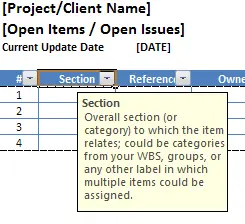
Description: This open items template is your basic log, which uses an excel table, so as items are added all formatting is maintained.  This template is designed to print out on standard sized paper and is set to print landscape. The print range is dynamic, so if the number of open items extends beyond one page, the header will carry over to the next page.  Other features of this template include:
  • Input messages - when you click on one of the field names a brief description of that field is shown; see picture to the left
  • Header/Footer containing file location, date document is printed, and page numbers (# of ##)
  • Fields to track Project Name, Project Status, etc.
Open Items v1
File Size: 39 kb
File Type: xlsx
Download File

Picture

Open Items Template - Detailed with Priority

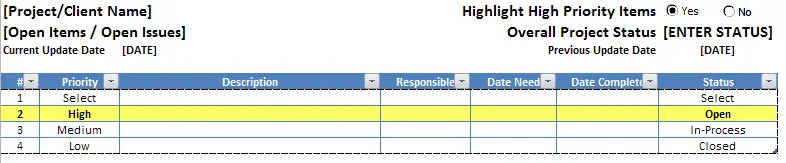
Description: This open items log is exactly like the first, however, a 'Priority' column has been added which includes a drop down list (containing High, Medium, Low).  In addition, in the upper right hand corner we've added a selection tool to turn highlights on and off - if show highlights is turned all rows containing High priority items will be highlighted yellow and will have bold text.
Open Items v2
File Size: 40 kb
File Type: xlsx
Download File

Picture

Open Items Template - Short List with Priority

Description: Keeping the priority column as in open items listing v2 we simply reduced some columns that may not be necessary for all projects.  This allows the listing to be printed in portrait orientation greatly increasing the number of items or issues being tracked on a single page.  
Open Items v3
File Size: 40 kb
File Type: xlsx
Download File

Picture

Open Items Template - Short List with Priority & Summary Stats

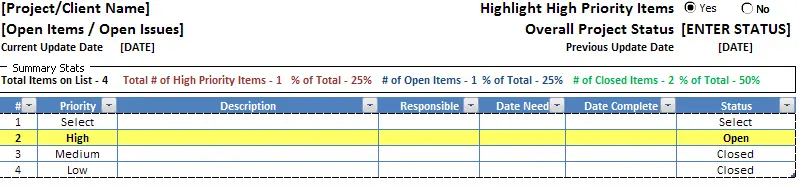
Description: Using the template from v3, we wanted to add some key summary information to the open items log template.  You can see in the picture to the right there is a 'Summary Stats' section that has been added just above the actual listing.  The information reflected within this section will update as changes are made to the log, providing a snapshot of the information that has been entered.  This comes in very handy when dealing with a large number of individual items.  The summary information includes the following:
Open Items v4
File Size: 41 kb
File Type: xlsx
Download File

Picture
  1. Total Items on List
  2. Total Number of High Priority Items
  3. Percent of High Priority Items to Total (same color as 2)
  4. Number of Open Items
  5. Percent of Open Items to Total (same color as 4)
  6. Number of Closed Items
  7. Percent of Closed Items to Total (same color as 6)

Open Items Template - No Frills

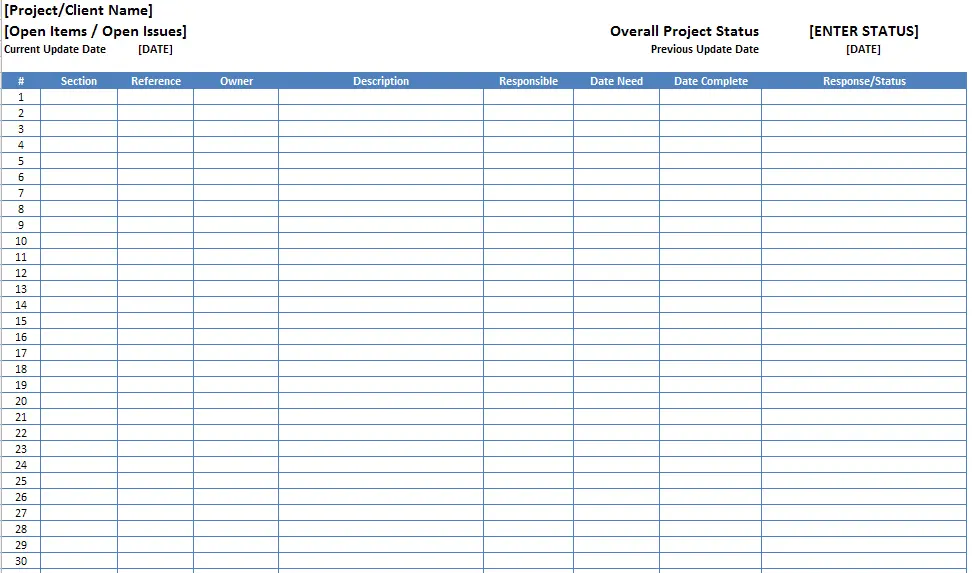
Description: Okay, so this template isn't exactly 'no frills' it does come with a dynamic print range that will adjust as rows are added/removed and will extend as far down 300 rows.  We used the offset function to accomplish this task.  In addition, the header will continue to print at the top of each page...but other than that this is as basic as a log can come.  No summations, no filters, no table, no dropdown boxes, no summary data...you get the point.

Open Items v5
File Size: 40 kb
File Type: xlsx
Download File

Picture
blog comments powered by Disqus

Picture


Other Useful Tools & Excel Templates


Picture
Picture

Personal Finance

Business Evaluation

Picture
Picture

Project Management

Charts


Question or comments?  Reach us Here

* Note, utilizing the features of this excel template requires Microsoft Excel® 2007 or later - this template/tool will not work in 2003.

Microsoft® and Microsoft Excel® and Microsoft Word® are registered trademarks of Microsoft Corporation. SpreadsheetShoppe.com is not associated with Microsoft.